top of page

I want to tell you something that changed how I think about money in business. It is not a budgeting hack. It is not a savings trick. It is a single view.


One screen. One place where you can see your income, your expenses, your savings, your debt, and your net worth all at the same time. That is a financial dashboard. And once you have one, you will never go back to guessing.


I know that sounds dramatic. But here is why I believe it so strongly. When I talk to small business owners, the number one thing I hear is not "I do not make enough money." It is "I do not know where my money is going." They are earning. They are spending. They are busy. But they are making decisions in the dark because they do not have a clear picture of their financial reality sitting in front of them.


And the data backs this up. According to SCORE, 82% of small businesses that fail do so because of cash flow problems. Not because they did not have customers. Not because their product was bad. Because they could not see what was happening with their money fast enough to make good decisions. QuickBooks found that 42% of small business owners admit they had limited or no financial literacy before starting their business, and that low financial literacy costs owners an average of $118,121 in lost profit over the life of the business.


A financial dashboard does not make you a financial genius overnight. But it does give you something that most business owners are missing: clarity at a glance. And clarity changes everything.


Small business owner viewing a colorful financial dashboard on a laptop showing monthly income and expenses bar charts spending category pie chart and net worth trend line at a modern desk with warm natural lighting

What Is a Financial Dashboard and Why Does Your Small Business Need One?


Think of a financial dashboard like the dashboard in your car. You do not need to understand the engineering of your engine to know that when the fuel gauge drops to empty, you need gas. When the temperature light turns red, something is wrong. When your speedometer shows 90 in a 45 zone, you should probably slow down.


A financial dashboard works the same way. It takes the most important numbers in your business and personal finances and puts them in one visual, easy-to-read view. Instead of digging through bank statements, spreadsheets, invoices, and receipts every time you want to know if you can afford something, you open your dashboard and see the answer.


As LivePlan's Noah Parsons put it: "If you are only watching your company's bank balance, that is a lot like only watching the check engine light while you are driving and completely ignoring the speedometer and gas gauge. Maybe you will know you are not in immediate danger, but you are missing a lot of other important information, and that can get you into trouble."


At its core, a good small business financial dashboard shows you five things: how much money is coming in, how much money is going out, how much you have saved, how much you owe, and what you are worth when you subtract the debt from the assets. That is it. Income, expenses, savings, debt, net worth. Five numbers. One view.


And here is what I want you to understand: you do not need expensive software to build this. You do not need to hire a CFO. You do not need to be good at math. If you can look at a screen and read a number, you can use a dashboard. The setup takes a little effort, but I promise you, it pays for itself in better decisions within the first month.


The Real Cost of Not Having a Financial Dashboard


Let me share some numbers that honestly shocked me when I first saw them. According to SCORE and HBK CPA, small business owners spend more than 20 hours per month on financial tasks like bookkeeping, invoicing, and reconciliation. That is 25% of a standard work week spent on number-crunching. And despite all that time, 46% of small business owners still do not review their financial reports on a monthly basis.


Let that sink in. Twenty hours a month on financial busywork, and nearly half still do not have a clear picture of where they stand.


That is not a discipline problem. That is a system problem. When your financial information is scattered across bank accounts, credit card statements, spreadsheets, and shoeboxes full of receipts, looking at the big picture feels overwhelming. So you avoid it. Or you check one thing at a time: your bank balance on Monday, your credit card bill on Wednesday, your revenue report whenever you remember. You never see it all together.


And that fragmented view is where expensive mistakes hide. You hire a contractor because your bank account looks healthy, but you forgot about the quarterly tax payment due next week. You invest in new equipment because revenue is up, but you did not notice that expenses grew faster than income last month. You take on debt because cash feels tight, but your accounts receivable is actually sitting at $15,000 that nobody has collected.


Forty-five percent of small businesses fail to track all of their expenses, and that oversight leads to an estimated 20% annual profit loss. According to Fortunly's 2026 analysis, 48% of small businesses that closed in 2025 ran out of cash. Not revenue. Cash. Because they could not see the gap between what was coming in and what was going out until it was too late.


A dashboard does not just show you numbers. It shows you relationships between numbers. And those relationships are where the real insight lives.

As the team at Blue Federal Credit Union wrote about the financial metrics every business should track: "The problem is not intelligence. It is structure." A dashboard gives you that structure.


And here is the encouraging part. Palo Alto Software reports that businesses that check in with their numbers regularly are 30% more likely to grow. QuickBooks found that 98% of small business owners who work with financial tracking tools say it boosts their confidence. You do not need more willpower. You need a better window into your money.


The 5 Essential Sections Every Small Business Financial Dashboard Needs


I am going to walk you through exactly what belongs on your dashboard and why. You can build this in a Google Sheet (if you followed our Google Sheets budgeting guide, you already have the foundation), or you can use Money Mastery's built-in reporting dashboard that does most of this automatically. Either way, the five sections are the same.


Section 1: Income Overview and Revenue Tracking

This is your money-in. I want you to track three things here.

Your total income this month, broken down by source. If you have a service-based business, that might be client payments. If you sell products, it is sales revenue. If you have multiple income streams, list each one. The U.S. Chamber of Commerce recommends reviewing your profit and loss statement monthly, and your income overview is the first half of that picture.


Your income compared to last month. Is it up or down? By how much? You do not need a complicated year-over-year analysis right now. Just last month versus this month gives you a trend line that matters. Trezy's 2026 KPI guide lists revenue growth rate as one of the 27 essential financial KPIs every small business should track, and your dashboard makes it visible without any manual calculation.


Your income compared to your baseline. If you read our post on how to budget with irregular income, you know the power of identifying your lowest recent month and using it as your planning floor. Your dashboard should show where this month sits relative to that floor. Are you above it? You have surplus to allocate. Are you at or below it? Time to tighten up and protect your essentials.


This section alone will change how you feel about your business because it replaces the vague sense of "I think we are doing okay" with an actual number you can point to.


Section 2: Expense Tracker and Spending Category Breakdown

This is your money-out. And I need to be honest with you: this is the section most people avoid building because they do not want to see it. I get that. But avoiding it is exactly how spending leaks grow into spending floods.


Your dashboard should show total expenses this month, broken down into categories. For a small business, I recommend keeping it simple: operating costs, owner's pay, taxes set aside, subscriptions and software, and everything else. If you need a refresher on how to categorize effectively, our post on how to track expenses effectively as a small business breaks it down step by step.


It should also show your expenses compared to last month. That month-over-month comparison is what catches the creep before it becomes a crisis. Blue Federal Credit Union's 2026 guide lists operating expenses as one of their top 10 metrics, noting that "expenses grow quietly" through unused subscriptions, underperforming ad spend, and software overlap.


And it should flag anything unusual. A subscription that jumped $20. A vendor charge that appeared twice. A category that suddenly spiked. These are the things that a static spreadsheet misses but a well-designed dashboard highlights immediately. We covered how to spot these kinds of surprises in our post on 7 spending leaks that quietly drain your business.


This is where I want to talk about something I am really proud of in Money Mastery. Our reports do not just show you what you spent. They let you talk with your money. What I mean by that is you can click into any category, see every transaction, compare it to previous months, attach receipts, and flag items for follow-up. It is not a passive report you read and forget. It is an interactive conversation with your financial data. You ask questions: "Why did my software costs go up?" "Did that refund actually come through?" "Am I spending more on supplies than last quarter?" And the dashboard answers.


Money Mastery financial dashboard expense tracker showing color-coded monthly spending categories with month-over-month comparison arrows and a flagged transaction highlighted in yellow for review

I built Money Mastery's reports this way on purpose. Because I have seen too many business owners stare at a spreadsheet full of numbers and feel nothing. No insight. No action. Just overwhelm. The reports inside Money Mastery are designed to make you curious, not confused. They are designed to make you want to dig in, not shut the laptop. That is the difference between a report that sits in a folder and a dashboard that actually changes how you run your business.


Section 3: Savings Snapshot and Emergency Fund Progress

This section is simpler but just as important. I want you to see three numbers here.


Your emergency fund balance and what percentage of your three-to-six-month target it represents. We talked about why this matters in our post on how to build an emergency fund for your small business. Seeing that number on your dashboard every week keeps the goal alive. It is the difference between "I should save more" and "I am 62% of the way to my safety net, and I added $400 this month."


Your tax savings account balance. If you are self-employed, this is critical. That 25% to 30% you should be setting aside from every deposit? You need to see it growing. When quarterly tax time arrives, there should be zero panic because the money is right there on your dashboard. If you are not sure how much to set aside, our post on small business tax deductions you might be missing helps you understand what is deductible so you can estimate your actual tax burden.


Any other savings goals you are working toward. A new piece of equipment. A training investment. A business expansion fund. Seeing progress toward these goals on the same screen as your income and expenses gives you motivation that a buried savings account never will. If you set those goals using the framework from our financial goal-setting guide, your dashboard becomes the scoreboard that keeps you accountable.


Section 4: Debt Overview and Interest Rate Comparison

I know this one can feel heavy. But I have learned that the business owners who face their debt openly are the ones who pay it off fastest. Hiding from it only makes it grow.


Your dashboard should show each debt you carry: the balance, the interest rate, the minimum payment, and the payoff date at your current pace. Credit cards, business loans, lines of credit, equipment financing, anything you owe.


Why the interest rate? Because that single number tells you which debt is costing you the most every day it sits there. QuickBooks found that 57% of small business owners say high interest rates and substantial interest charges are the top disadvantage of using credit cards for business. When you see that 24.99% APR staring at you from the dashboard next to a 6% equipment loan, the priority becomes obvious without anyone having to tell you.


And here is something I think is really powerful: when your debt overview sits on the same page as your savings snapshot, you can see the trade-off in real time. Is it smarter to build savings or pay down that high-interest card? The dashboard shows you both sides of the equation. No guessing. No spreadsheet gymnastics. Just the two numbers, sitting next to each other, telling you what to do.


Fortunly's 2026 data found that 38% of small business failures in 2025 were attributed to the inability to service high-interest variable debt. A dashboard does not eliminate debt. But it makes sure debt never surprises you.


Section 5: Net Worth Tracker for Long-Term Financial Growth

This is the number most people never calculate, and it is the one that matters most over time. Net worth is simple: everything you own (assets) minus everything you owe (liabilities).


For a small business owner, assets include your business bank accounts, savings, investments, equipment value, inventory, and accounts receivable. Liabilities include all the debts from Section 4 plus accounts payable.


Here is why I want this on your dashboard: because it is the only number that tells the whole story. Your income could be great while your net worth is shrinking (you are earning but spending faster). Your income could be modest while your net worth is climbing (you are earning less but keeping more). The Federal Reserve's 2025 report on Economic Well-Being found that small business owners generally have higher income, savings, and household wealth than non-owners, but only when they actively manage their finances. The dashboard is how you actively manage.


Update your net worth monthly. Watch the trend. That single line going up or down over time is the most honest measure of whether your financial life is moving in the right direction.


And listen, I am not going to pretend this number always feels good. Some months it goes down. That is okay. The point is not to always see growth. The point is to always see truth. When you know where you stand, you can make real decisions from a real position. That is power.


Money Mastery Net Worth Freebie

How to Build Your Financial Dashboard in 30 Minutes or Less


I am going to give you two paths because I know everyone is starting from a different place.


Path 1: Building a Free Financial Dashboard in Google Sheets

If you already built a budgeting spreadsheet from our Google Sheets budgeting guide, you are 70% there. Here is exactly what to do.


Create a new tab in your existing spreadsheet and name it "Dashboard." Set up five sections with the headers I described above: Income Overview, Expense Tracker, Savings Snapshot, Debt Overview, Net Worth. Use simple SUM and comparison formulas to pull totals from your existing budget and expense tabs.


For the month-over-month comparison, create a column that calculates the percentage change between this month and last month for each category. Use conditional formatting so that cells turn green when you are on track and red when something needs attention. Google Sheets has a built-in conditional formatting feature that takes about two minutes to set up.


For your net worth, create a simple two-column section: one column for assets, one for liabilities. List each item with its current value. At the bottom, subtract total liabilities from total assets. That is your net worth. Format it in bold so it stands out.


Schedule 15 minutes at the end of each week to update the numbers. This approach works. It is free. And the act of manually entering data forces you to pay attention to every number. The downside is that it requires discipline to maintain and it will not flag things automatically. QuickBooks found that 71% of small business owners still use pen, paper, or spreadsheets for some aspect of their finances, so you are not alone if this is where you start.


Path 2: Using Money Mastery's Automated Dashboard and Reports

This is what I built Money Mastery to do. And honestly, this is the part I am most excited to tell you about, because I built it specifically for the business owners who tried the spreadsheet route and found themselves abandoning it after three weeks.


When you upload your csvs to Money Mastery, the dashboard populates automatically. Income, expenses, all in one view, updated in real time. No manual entry. No formulas to break. No formatting to fiddle with.


But the dashboard is just the starting point. The real magic is in the reports.

Money Mastery's reports are not spreadsheets you stare at. They are tools you use.


Here is what I mean:

You can filter by date range, category, vendor, or account. Want to see only your software subscriptions for the last 90 days? Two clicks. Want to compare your January expenses to your June expenses? Side by side, instantly.


You can drill into any category and see exactly which transactions drove a change. If your "operating costs" jumped 15% this month, you do not have to guess why. Click in, see the line items, and you will know in seconds whether it was a one-time expense or a new pattern.


You can flag a transaction as "needs review" and come back to it during your monthly financial review. No more scribbling on sticky notes or making mental reminders that you forget by Tuesday.


You can attach a receipt directly to a transaction so that when tax time comes, everything is already organized. No more digging through that receipt shoebox we talked about in our receipt organization post.


You can see month-over-month changes highlighted automatically. If your internet bill went up $12 or a new charge appeared that was not there last month, Money Mastery flags it. You decide what to do about it. The system just makes sure you see it.


The reports let you have a real conversation with your money. Not a lecture. Not a guilt trip. A conversation. "Where did this go? Was it worth it? Should I do it differently next month?" That back-and-forth is where financial mastery actually happens. Not in knowing more, but in paying attention more consistently.


I have watched business owners go from feeling lost in their finances to feeling genuinely confident in under 30 days. Not because Money Mastery gave them more information. Because it gave them the right information, in the right format, at the right time. That is what a good dashboard does.


Money Mastery financial dashboard

How to Use Your Dashboard Every Week and Every Month

Building the dashboard is step one. Using it is where the transformation happens. Here is exactly how I recommend making it part of your routine.


Your Weekly 5-Minute Dashboard Check-In

Open your dashboard every week. I like to do mine on Monday mornings before I start working on anything else. It takes five minutes, and it sets the tone for every decision I make that week.


Look at income and expenses for the week. Does anything look off? Any charges you do not recognize? Any invoices you expected that have not arrived? Make a note and move on. That is it. Five minutes. You are not analyzing. You are scanning. Think of it like checking the weather before you leave the house. Quick glance, adjust if needed, keep moving.


Your Monthly 30-Minute Financial Dashboard Review

This is your deep review, and it aligns perfectly with the process we outlined in our monthly financial review checklist. Compare this month to last month across all five sections.


Look for trends. Is income growing or shrinking? Are expenses creeping up? Is your savings rate on track? Has your net worth moved in the right direction? Has any debt balance gone up unexpectedly?


This is also when you reconcile your dashboard against your bank statements. We covered that full process in our bank statement review guide. The dashboard gives you the big picture. The bank statement review confirms the details. Together, they make sure nothing slips through.


In Money Mastery, this monthly review is even simpler. The reports already show you month-over-month changes, flagged items, and category comparisons. You just open, review, and act. Twenty minutes, not two hours.


Your Quarterly 45-Minute Strategic Financial Review

Zoom out every three months. Look at the quarter as a whole. Are your financial goals from our goal-setting post on track? Do your budget allocations still make sense, or does reality look different from the plan? Is your net worth trending the way you want it to?


This is the meeting you have with yourself (or your accountant, or your partner) to make adjustments. It is not about perfection. It is about course correction. Even a small adjustment every quarter compounds into massive improvement over a year.


The beautiful thing about a dashboard is that it makes all of this faster. When the data is already organized and visual, a monthly review takes 20 minutes instead of two hours. A quarterly check-in becomes a real strategic conversation instead of a frantic scramble to figure out what happened.


Common Financial Dashboard Mistakes to Avoid


I have seen a lot of business owners get excited about building a dashboard and then abandon it within a month. Here are the mistakes that cause that, and how to avoid them.


Tracking too many metrics at once. You do not need 27 KPIs on day one. Start with the five sections I outlined above. Trezy recommends starting with five or six KPIs and expanding as your confidence grows: "You can not manage what you do not measure. Start with 5 KPIs, then expand as your team matures." More metrics can come later. Right now, you need clarity, not complexity.


Building it but never looking at it. A dashboard you do not check is just a pretty spreadsheet. Block time on your calendar. Monday morning, 5 minutes. First of the month, 30 minutes. Put it on the calendar like you would a client meeting. Because this meeting is with the person who matters most to your business: you.

Not acting on what you see. The point of a dashboard is not to look at numbers and feel informed. It is to look at numbers and do something. If your expenses jumped, investigate why. If a subscription appeared that you do not recognize, call and cancel. If your net worth dropped, figure out whether it was a one-time event or a pattern. The dashboard shows. You decide.


Forgetting to update it. If you are using a manual Google Sheet, set a weekly reminder. If you are using Money Mastery, the data updates automatically, but you still need to log in and look. The tool works. It just needs your eyes on it.


Your Action Step This Week


Here is what I want you to do before next Sunday. Pick your path, either Google Sheets or Money Mastery, and build the first two sections of your dashboard: Income Overview and Expense Tracker. Just those two. Get your numbers in. Look at them. Compare this month to last month.


If you find one expense that surprises you, one charge you forgot about, one number that makes you say "wait, really?" then the dashboard is already working. And I promise you, once you see your money laid out in front of you like that, you will want to build the rest.


If you want the fastest way to get started, grab our free Net Worth Tracker. It puts your personal and business accounts side by side across sixty account types and twelve tabs, and it stays yours.


Your money is already telling a story. A dashboard just makes sure you are finally listening.


Frequently Asked Questions About Building a Small Business Financial Dashboard


Do I need accounting software to create a financial dashboard?

No. You can build a perfectly functional dashboard in Google Sheets or Excel with basic formulas and conditional formatting. QuickBooks found that 71% of small business owners still use spreadsheets for at least some aspect of their finances, so starting there is completely normal. The advantage of a tool like Money Mastery is that it automates the data entry, categorization, and comparison so you spend less time updating and more time analyzing. But a manual dashboard you actually use beats a fancy tool you ignore.


How often should I update my small business financial dashboard?

At minimum, once a month. Ideally, your income and expense sections get a quick weekly glance (five minutes), and the full dashboard including savings, debt, and net worth gets a monthly review. If you use Money Mastery, the data updates automatically so there is nothing to manually refresh. The habit of looking at it is what matters.


What if my business is brand new and I do not have much data yet?

Start now anyway. Even one month of data gives you a baseline. Two months gives you a comparison. Three months gives you a trend. The worst time to build a dashboard is after a financial crisis when you are scrambling to understand what went wrong. The best time is right now, when you can still shape the story.


What is the difference between a financial dashboard and a financial report?

A financial report is a static document that covers a specific time period, like a monthly profit-and-loss statement. The U.S. Chamber of Commerce recommends reviewing six key reports monthly, including P&L, balance sheet, and cash flow statements. A dashboard is a living view that shows your current financial position and updates as new data comes in. Reports tell you what happened. Dashboards help you decide what to do next. Money Mastery gives you both.


Should I include personal finances on my business dashboard?

If you are a sole proprietor or freelancer whose personal and business finances overlap, yes. Your personal expenses, savings, and debt affect your business decisions whether you track them or not. Keeping them on the same dashboard, but in clearly separated sections, gives you the full picture. If you have struggled with that line, our post on how to separate business and personal finances is a great companion to this one. And if you are confused about which expenses belong where, our business expense vs. personal expense guide breaks it down clearly.


What are the most important metrics to put on my dashboard first?

Start with income, expenses, and cash flow. Those three alone give you 80% of the insight you need. Blue Federal Credit Union's 2026 guide and Trezy's KPI framework both emphasize that cash flow is the foundation. Add savings, debt, and net worth once you are comfortable with the first three. You can always expand later, but you cannot benefit from a dashboard you never finish building.

Let me ask you something honest. When was the last time you actually paid yourself from your business?


Not a random transfer when the bills got tight. Not a "I'll figure it out later" grab from the business account. An actual, intentional, scheduled payment to yourself for the work you do every single day.


If you hesitated answering that, you are not alone. A Kabbage Inc. survey found that 51 percent of small business owners have gone multiple consecutive months without paying themselves. Twenty-six percent went two to six months without a paycheck. Another 25 percent went more than six months. And these are not brand-new businesses finding their footing. The average participant in that survey had been running their business for 10.5 years.


Let that sink in. A decade of work. And half of those owners still were not paying themselves consistently.


A separate 2022 Wave Financial survey reported by CNBC confirmed the pattern: 26 percent of small business owners do not pay themselves a salary at all. Not "sometimes skip a month." They just do not take a paycheck. Period.


Here is what I want you to hear today: paying yourself is not a luxury. It is not something you earn after some magical revenue milestone. It is not selfish. It is the single clearest signal that your business actually works. And if it does not work yet, paying yourself is the honest signal that tells you what needs to change.


This post is going to walk you through how to pay yourself as a business owner in a way that feels good, stays sustainable, and removes the guilt entirely. We will cover the methods, the math, the mindset shift, and a system you can set up this week.


Smiling small business owner looking at a direct deposit notification on their phone at an organized desk with warm natural lighting

Why So Many Business Owners Skip Their Own Pay


Before we talk about how, let's talk about why this keeps happening. Because the mechanics are not actually that complicated. The barrier is almost always emotional.


The Kabbage survey paints a vivid picture of what happens when owners do not pay themselves. Sixty-three percent regularly stress over cash flow. Forty-two percent have sacrificed their social lives and hobbies. Thirty-five percent lose sleep. Thirty-two percent say their family life suffers. And 91 percent spend up to 20 hours per week on cash flow management (Kabbage/NJBIA).


That is not a financial strategy. That is a slow burn toward exhaustion.


The guilt usually sounds like one of these:


"The business needs the money more than I do." But here is the thing. You are the business's most important asset. When you are stressed about your personal bills, you make worse decisions. You take on clients you should not take. You underprice because you are desperate. You cannot think clearly about growth when you are worried about groceries. Paying yourself protects the asset that generates all the revenue.


"I will pay myself later when things are more stable." Later never comes unless you define what "stable" means in advance. The Kabbage data proves this. Ten-year-old businesses were still skipping pay. If you do not build a system now, you will keep moving the goalpost.


"It feels selfish to take money out when I could reinvest." Reinvestment is great. But it should be a conscious choice with its own budget line, not the default that happens because you never took your share. Those are two very different things.


Waseem Daher, CEO of Pilot, put it perfectly in CNBC's coverage: "You need to figure out how to make this long-term sustainable for you, and that probably requires paying yourself more than you think. You need to be paying yourself enough to truly cover your costs so you can focus on making the business truly successful."


If you have been following this series, especially our posts on cash flow management and building a business emergency fund, then paying yourself is the natural next step. You have stabilized the business. You have created a buffer. Now you build the system that takes care of you, too.


Owner's Draw vs. Salary: The Two Ways to Pay Yourself

How you technically move money from your business to your personal account depends on your business structure. There are two main options: a salary and an owner's draw.


What Is a Salary?

A salary is a fixed amount you pay yourself on a regular schedule through payroll. Taxes are withheld automatically, just like they would be for any employee. At the end of the year, you get a W-2.


This method is required (or strongly recommended) for S Corporations, C Corporations, and LLCs that have elected corporate taxation. If you are an S Corp owner-employee, the IRS specifically requires you to pay yourself a "reasonable salary" before taking any additional distributions.


The upside of a salary is stability. You know exactly what is hitting your personal account every pay period, which makes budgeting your personal life so much easier. Taxes are handled automatically, which means no scary quarterly payment surprises.


The downside is that salaries are fixed obligations. If you have a slow month, you still owe yourself (and the IRS) that amount.


What Is an Owner's Draw?

An owner's draw is when you simply transfer money from business profits to your personal account. No taxes are withheld at the time. You handle the tax obligation when you file your return and through quarterly estimated payments throughout the year.


Draws are the standard approach for sole proprietors, partnerships, and most LLCs taxed as pass-through entities.


The upside is flexibility. You can take more during good months and less during slow ones. No payroll system is needed.


The downside is inconsistency. Without a fixed schedule, draws become irregular or stop happening altogether, which is exactly what the Kabbage survey revealed. Draws also require real discipline around tax savings, because nothing is withheld automatically.


Can You Do Both?

Yes. For S Corp owners, this is actually the recommended approach. You pay yourself a reasonable salary through payroll (which covers employment taxes), and then take additional distributions from remaining profits (which are subject to income tax but not payroll tax). This gives you stability plus tax efficiency.


The key word is "reasonable." The IRS has audited and penalized business owners who set artificially low salaries to reduce payroll tax. Paying yourself $15,000 while distributing $200,000 will raise red flags (IRS).


Infographic comparing owner's draw versus salary methods for paying yourself as a business owner with key differences highlighted

How Much Should You Pay Yourself?


This is the question that keeps people stuck. So let's simplify it with three solid frameworks.


Framework 1: Profit First Percentages

If you read our Profit First post, you already know the basics. Mike Michalowicz's system allocates every dollar into specific accounts before expenses touch it. Owner's Pay is one of the four core allocations.


Here are the recommended percentages based on real revenue (total revenue minus materials and subcontractors), pulled directly from Relay Financial's Profit First breakdown:


  • Under $250K in real revenue: 50% to Owner's Pay, 30% to Operating Expenses, 15% to Taxes, 5% to Profit.

  • $250K to $500K: 35% to Owner's Pay, 40% to OpEx, 15% to Taxes, 10% to Profit.

  • $500K to $1M: 20% to Owner's Pay, 50% to OpEx, 15% to Taxes, 15% to Profit.

  • $1M to $5M: 10% to Owner's Pay, 55% to OpEx, 15% to Taxes, 20% to Profit.

  • $5M and above: 5% to Owner's Pay, 55% to OpEx, 15% to Taxes, 25% to Profit.


    Notice what happens as revenue grows. The percentage drops, but the dollar amount increases. Five percent of $5 million is $250,000. The system scales with you.


And notice the most important thing: at the entry level, Owner's Pay is the largest allocation at 50 percent. That is intentional. If you are doing most of the work in a sub-$250K business, you should be receiving the majority of the revenue. That is not greedy. That is how the math works.


Four labeled glass jars on a desk showing Profit First allocation with Owner's Pay as the largest portion for small business budgeting

Framework 2: The Gusto Six-Step Method

Gusto's approach works from the bottom up:


Start with your average monthly net income over the last six months. Subtract 30 percent for taxes (adjust based on your bracket). Subtract your minimum monthly debt payments. Subtract your monthly business savings goals (emergency fund, equipment, growth reserves). What remains is your "owner access number," which is the maximum available for your pay.


Then calculate your personal "need number," which is the minimum you need to cover your fixed expenses, variable expenses, and essential costs.


If your owner access number is larger than your need number, pay yourself the need number (or more) and allocate the surplus to debt payoff or savings. If your need number is larger than your access number, you adjust by reducing business savings, cutting personal extras, or finding ways to increase revenue.


This method is fantastic if you need a grounded starting point based on real current numbers rather than aspirational percentages.


Framework 3: Industry Benchmarks

PayScale reports the average small business owner salary in 2026 at $77,823. Vena Solutions cites $69,647 as the average, exceeding the national average wage by 6 percent. Self-employed owners average $51,816. The U.S. Chamber of Commerce places the range between $37,000 and $179,000, depending on industry and location.


Use these as sanity checks, not rigid targets. A business earning $80,000 in revenue cannot pay its owner $77,000. Context matters. But if your business earns $300,000 and you are paying yourself nothing, these benchmarks show you just how far off you might be.


Your Business Structure: A Quick Reference


The method you use depends on how your business is organized. Here is the simplified version:


Sole Proprietorship: You and the business are one entity. Pay yourself through owner's draws. You will owe self-employment tax (15.3%) on net earnings. Make quarterly estimated payments to avoid penalties.


Partnership: Profits split per your partnership agreement. Each partner takes draws or guaranteed payments. Self-employment tax applies to your share.


LLC (taxed as pass-through): Same as sole proprietorship or partnership depending on single or multi-member. You take draws. Self-employment tax applies.


S Corporation: You must pay yourself a reasonable salary through payroll (subject to employment taxes). Additional profits can be taken as distributions (subject to income tax but not payroll tax). Both the salary and distribution need to be documented.


C Corporation: You are an employee. Salary through payroll with full withholding. Additional compensation comes as dividends, which face double taxation (corporate level and personal level).


The IRS page on Paying Yourself covers the compliance details for each structure. If you are unsure which is right for you, especially if you are a sole proprietor considering an S Corp election, a conversation with a CPA is worth it. But regardless of structure, you have a way to pay yourself. The question is not whether you can. It is whether you will.


The Simple System: Making Owner's Pay Automatic


Knowing the theory is one thing. Building a system that actually works every single month is another. Here is how to make it automatic.


Step 1: Open a Dedicated Owner's Pay Account

If you have already separated your business and personal finances (which we covered early in this series), you are halfway there. Now add one more account: a holding account specifically for your compensation.


This sounds like a small thing, but it is actually a huge psychological shift. When your pay sits in its own account, taking it feels like receiving a paycheck rather than "taking from the business." That reframe matters for everyone who has been stuck in guilt mode.


Step 2: Choose Your Number

Using whichever framework fits your situation:


If you are just starting and have never paid yourself, begin at 10 percent of net profit. You can increase by 2 to 5 percent each quarter. Even a small, consistent amount builds the habit.


If your business is under $250K and you are doing most of the work, target 30 to 50 percent of net profit (aligned with Profit First).


If your business is between $250K and $500K with some employees, target 20 to 35 percent.


If you are above $500K, benchmark your salary against industry data and supplement with distributions.


Write the number down. Make it specific. "I will pay myself $3,200 per month" is infinitely better than "I will take what's left."


Step 3: Set a Pay Schedule

Chris Ronzio, founder of Trainual, recommends paying yourself at the same frequency you pay employees (CNBC). If you are solo, the Profit First 10/25 rule is a great default: transfer your owner's pay on the 10th and 25th of each month.


The specific dates matter less than the consistency. A fixed schedule means you never have to "decide" whether to pay yourself this period. It just happens.


Step 4: Automate the Transfer

Set up an automatic transfer from your business account to your Owner's Pay account on your chosen dates. If your bank supports percentage-based transfers, configure it to move your chosen percentage every time revenue comes in.


Automation removes the decision point. The only way you stop paying yourself is by actively turning off the automation. That friction is intentional. It protects you from your own guilt reflex during a stressful week.


Step 5: Review Quarterly, Not Weekly

Once the system is running, resist the urge to adjust it every time you have a slow week. Review quarterly, aligned with your monthly financial review.


Ask:

Is my business cash flow healthy at this level?


Am I covering my personal needs?


Is there room to increase by 1 to 2 percentage points next quarter?


If yes to all three, bump it up. If cash flow is tight, look at whether the issue is revenue (growth problem) or expenses (leak problem, which we addressed in 7 spending leaks draining your business). Quarterly adjustments give you responsiveness without chaos.


Putting It All Together With Your Budget


Once your owner's pay amount is set, it needs a home in your budget. If you have been using Google Sheets for budgeting, create a row under Fixed Operating Costs labeled "Owner's Compensation." Enter your monthly amount. Treat it with the same weight as rent or insurance. It is not optional. It is not a bonus. It is a cost of doing business, because without you, there is no business.


On the personal side, your owner's pay becomes your income line. From there, you apply all the principles we have covered: separating needs and wants, building savings, making conscious spending decisions.


And if your income is irregular (which we tackled in how to budget with irregular income), your owner's pay system actually solves the problem. Even if business revenue bounces around, your personal pay stays consistent as long as you maintain a buffer in your Owner's Pay account. High months fill the buffer. Low months draw from it. The result: stable personal income despite unstable business income.


Google Sheets business budget with Owner's Compensation highlighted as a fixed operating cost line item on laptop screen showing Money Mastery System

Mistakes That Trip People Up


Taking too much too soon. Paying yourself is essential, but paying more than the business can support creates cash flow crises that force you to stop paying yourself entirely. Start conservatively and increase as margins allow.


Forgetting taxes. If you take an owner's draw without setting aside 25 to 30 percent for taxes, you will face a painful surprise come filing time. Build tax savings into your system from day one.


Inconsistent timing. Paying yourself $4,000 one month, nothing for two months, then $7,000 makes personal budgeting impossible. A fixed schedule prevents this entirely.


Ignoring reasonable salary rules. S Corp owners who pay themselves a suspiciously low salary while taking large distributions are audit targets. The IRS uses factors like training, experience, duties, comparable salaries, and time devoted to determine "reasonable." Courts have consistently ruled against owners who manipulate this (IRS Fact Sheet 2008-25).


Waiting for permission. No one is going to tap you on the shoulder and say "okay, now you can pay yourself." You decide. You build the system. You make it happen. The business does not give you permission. You give yourself permission by running a business that supports it.


Your Action Step This Week


Here is what I want you to do before next Monday:


Pick one of the three frameworks above that resonates with your current situation. Calculate your number. Even if it is small. Even if it is 10 percent and that only comes out to $400 a month. Write it down.


Open a dedicated account (or designate an existing one) as your Owner's Pay account.


Set up your first automatic transfer for the next 10th or 25th, whichever comes first.


Then let it run. Do not overthink it. Do not negotiate with yourself about whether you "deserve" it this month. The system runs. You get paid. The business adjusts. And three months from now, you will look back and wonder why you waited so long.


If you want a framework to help you see your full financial picture, including where owner's pay fits alongside your expenses, savings, and profit, download the free Money Mastery Net Worth Tracker. It will give you the foundation to build a pay system that works for both your business and your life.


Frequently Asked Questions


How much should a small business owner pay themselves?

There is no universal answer, but solid frameworks exist. Profit First recommends 50% of real revenue for businesses under $250K where the owner does most of the work. Gusto recommends calculating your net income, subtracting taxes and expenses, and paying yourself from what remains. PayScale puts the average at $77,823 in 2026. Start where you can sustain, and increase quarterly.


What is the difference between an owner's draw and a salary?

A salary is a fixed amount paid through payroll with taxes withheld automatically. An owner's draw is a flexible withdrawal from business profits with no tax withholding at the time. Salary works best for S Corps and C Corps. Draws work best for sole proprietors, partnerships, and standard LLCs. Some S Corp owners use both.


Can I pay myself if my business is not yet profitable?

If you have revenue coming in and can cover your essential expenses, you can allocate a small percentage to owner's pay. Even 5 to 10 percent is better than nothing. If the business truly cannot support any owner compensation, that is important data. It tells you pricing, expenses, or your business model needs to change.


How often should I pay myself?

The same frequency you pay employees is a good rule. If you are solo, biweekly or twice monthly (the 10th and 25th) works well. Consistency matters more than the specific dates. Irregular, random withdrawals create budgeting chaos.


What if I feel guilty about paying myself?

The guilt is normal but not helpful. Reframe it this way: paying yourself is not taking from the business. It is investing in the person who makes the business run. Automate your pay so the decision is removed from the emotional equation. Over time, as you see the business continue to thrive while you are compensated, the guilt will fade and be replaced by evidence that your system works.


Does the IRS care how I pay myself?

Yes, especially if you are an S Corp. The IRS requires S Corp owner-employees to take a "reasonable salary" before taking distributions. What counts as reasonable depends on your role, industry, experience, and what comparable professionals earn. Paying yourself too little to avoid payroll tax can trigger an audit and penalties.


If you would like to talk it through with someone, Donna Roggio is a business coach with fifteen years of experience helping women sort this out, and a first call with her is free.

Related Posts:

Financial mistakes small business owners make rarely happen because of carelessness. They happen because nobody taught you this stuff. You learned how to deliver your service, build your product, and find your customers. But the financial side? Most business owners are figuring that out in real time, and the learning curve has a price tag attached to it.


According to a U.S. Bank study, 82% of business failures are tied to cash flow problems. A QuickBooks financial literacy survey found that 42% of small business owners started their businesses with limited or no financial literacy. And SCORE research shows that 60% of small business owners feel they don't have enough knowledge about accounting and finance.


None of those numbers are meant to make you feel bad. They're meant to show you that if you've made financial mistakes in your business, you're in the majority. The difference between staying stuck and moving forward is awareness. Once you can see the mistake, you can fix it.


Small business owner sorting through financial mistakes with receipts, bank cards, and laptop at kitchen table

Here are nine of the most common financial mistakes small business owners make, with a specific, actionable fix for each one.


Mistake 1: Mixing Business and Personal Finances

This is the most common starting point for financial chaos. QuickBooks data shows that 70% of small business owners have used a personal credit card for business expenses. The IRS specifically warns that not separating business and personal expenses is one of the four most common tax errors for small businesses, because it leads to mistakes when claiming deductions and creates serious problems during an audit.


When everything runs through one account, you can't see your true business profit. You can't see your real personal spending. And your tax preparation becomes a months-long untangling project instead of a straightforward process.


The fix: Open a dedicated business checking account if you don't have one. From this point forward, run all business income and expenses through that account. For transactions that are genuinely mixed, use a system that supports split transactions so you can allocate the correct amounts to each side. We covered this in detail in our post on how to separate business and personal finances.


Mistake 2: Not Tracking Where Your Money Goes

You can't manage what you can't see. Yet a surprising number of business owners operate without any real tracking system. They check their bank balance, make a mental estimate of what's coming in and going out, and hope for the best. That's not a financial strategy. That's a guessing game.


According to Forbes, not monitoring finances regularly is one of the biggest financial mistakes business owners make. The article emphasizes that regular financial monitoring helps identify issues early, like cash flow challenges, declining profitability, or unexpected expenses, so you can address them before they spiral.


The fix: Set up a tracking system that you'll actually use. This doesn't need to be complex. It needs to be consistent. Whether you use a spreadsheet, an app, or a comprehensive system like Money Mastery that brings personal and business finances together with AI-powered categorization, the important thing is that every dollar has a place and you can see the full picture. Start with our guide on how to track where your money goes if you're starting from scratch.


Mistake 3: Ignoring Cash Flow Timing

Revenue and cash flow are not the same thing. You can have $50,000 in outstanding invoices and still not be able to cover rent this week. Cash flow is about timing: when money actually arrives in your account versus when expenses are due.


The U.S. Chamber of Commerce Small Business Index and Kaplan Group research found that 51% of small businesses struggle with uneven cash flows. That's more than half of all small businesses operating in a constant state of cash flow uncertainty.


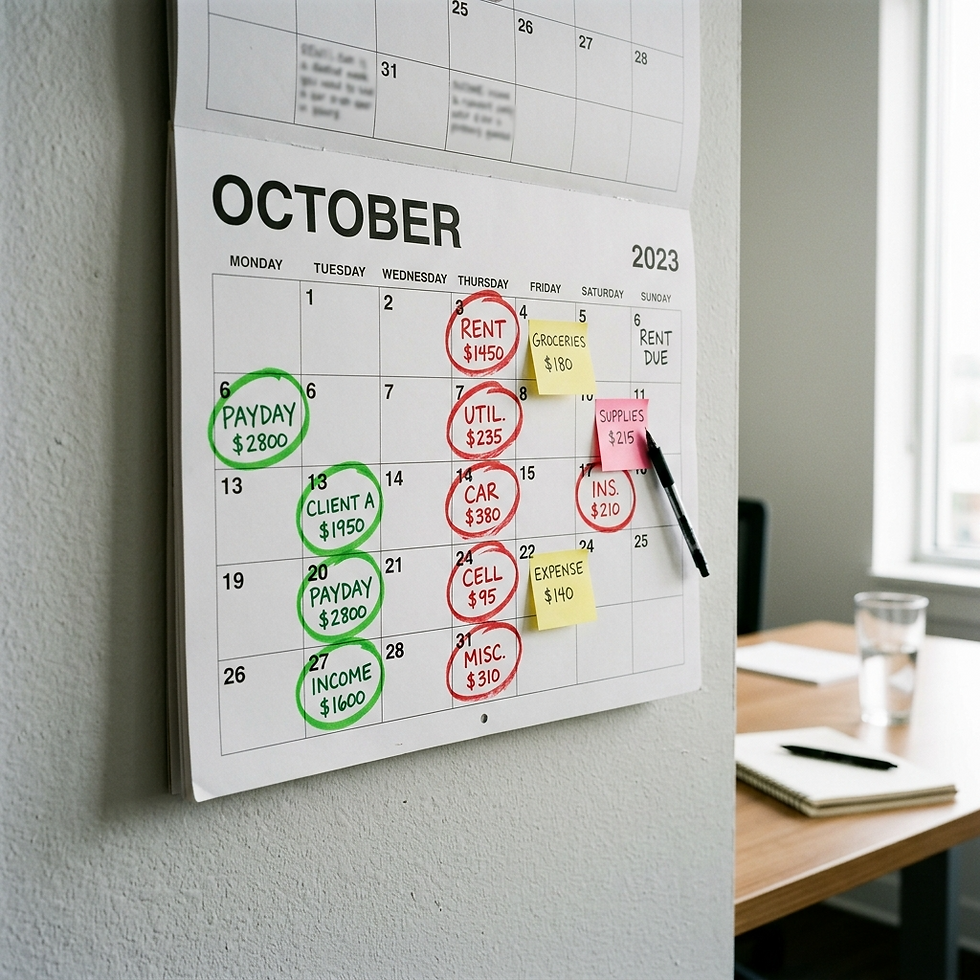
The fix: Start tracking when money comes in, not just how much. Look at your last three months and note the gaps between when you invoice and when you get paid. Then look at when your bills hit. If there's a pattern where expenses come due before income arrives, you need to either adjust your payment terms, build a cash buffer, or shift your billing schedule. Even a simple calendar view of money in versus money out by week can reveal timing problems you've been feeling but couldn't see.

Cash flow calendar showing bill due dates and income dates to help small business owners track timing gaps

Download the free 15-Minute Financial Clarity Starter Kit at https://moneymastery-system.com/starter-kit. It includes a spending leak audit and a personal P&L snapshot template that help you spot several of these mistakes in one sitting.


Mistake 4: No Tax Savings Strategy

The IRS doesn't wait for you to be ready. Underpaying estimated taxes is the first mistake on their official list of common small business tax errors. The penalty for underpayment is calculated on the amount you should have paid, and it adds up faster than most people expect. The IRS accuracy-related penalty alone is 20% of the underpayment amount.


A QuickBooks study found that less than half (48%) of small business owners are confident they're paying taxes correctly. That means more than half are unsure whether they're even meeting their basic tax obligations.


The fix: Set aside a percentage of every payment you receive for taxes. A common starting point is 25-30% of net income, though your actual obligation depends on your tax bracket and deductions. Open a separate savings account specifically for tax money. Every time revenue comes in, transfer the percentage immediately. When quarterly estimated taxes are due, the money is already there. This is general guidance, not tax advice. Consult a tax professional for your specific situation.


Mistake 5: No Emergency Fund

According to CBS News and Stearns Bank data, 44% of U.S. small businesses have less than three months of cash reserves. And Bankrate's 2026 Emergency Savings Report found that a significant portion of Americans have no emergency savings at all.


For a business owner, the absence of an emergency fund turns every unexpected expense into a crisis. A broken laptop, a client who doesn't pay, a slow month, a car repair. Without a buffer, these routine bumps become financial emergencies that force you to use credit cards, skip payments, or pull from funds earmarked for other obligations.


The fix: Start with a small, specific goal. Even $1,000 set aside in a separate account is better than zero. Once you hit that, aim for one month of essential expenses (both business and personal). Then build toward three months. The key is automating it: set up a recurring transfer on payday, even if it's just $50 or $100 per week. The Bank of America Small Business resource center suggests benchmarking your emergency fund at 10% of annual revenue as a starting target.

Small business emergency fund jar with calculator and savings goal showing progress toward financial safety net"

Mistake 6: Not Reviewing Your Numbers Monthly

Forbes highlights this clearly: one of the top financial mistakes business owners make is ignoring the numbers when things are going well. As one contributor put it, "If you aren't measuring it, you can't improve it. Expenses should always be managed and revenues should always be reviewed, no matter how the company is doing."


It's easy to avoid looking at your finances when you're busy. And it's even easier to stop looking when things seem fine. But "seems fine" is not a financial strategy. Monthly patterns, seasonal shifts, and slow-building problems only show up when you compare month to month consistently.


The fix: Schedule a 15-minute monthly review on the first of every month. Look at total income, total expenses, your top spending categories, and your net income compared to the previous month. That's it. We built out the complete process step by step in our monthly financial review checklist. Money Mastery's dashboard makes this even faster by showing income, expenses, trends, and comparisons in one view without you pulling numbers from multiple places.


Mistake 7: Using Too Few Expense Categories

This is a subtle mistake that compounds over time. When you track expenses using broad categories like "Office," "Marketing," or "Miscellaneous," you lose the ability to see what's actually happening. "Office expenses: $2,400" tells you almost nothing. "Software subscriptions: $890, office supplies: $340, printer maintenance: $180, co-working space: $600, internet: $390" tells you a story.


The Forbes article on common mistakes emphasizes the importance of comparing your estimated costs to actual expenses at frequent intervals. But you can only do that comparison meaningfully when your categories are specific enough to reveal patterns.


The fix: Expand your expense categories to match how you actually spend. At minimum, break each broad category into three to five specific sub-categories. If you want this done for you, Money Mastery uses 420 categories (20 income and 400 expense) that cover both business and personal spending in detail. Clarity AI learns your patterns and suggests the right category for each transaction, so the specificity doesn't create extra work.


Money Mastery 420 expense categories with Clarity AI suggesting the right category for a small business transaction

Mistake 8: Not Paying Yourself a Consistent Amount

Many business owners pay themselves whatever is "left over" at the end of the month. Some months that's generous. Some months it's nothing. This inconsistency makes personal financial planning nearly impossible and creates a cycle where your business always comes first and your personal financial health comes last.


The Consumer Financial Protection Bureau published research showing that small business owners experience more volatility in their personal finances than non-owners, despite having higher levels of income. That volatility is directly tied to inconsistent owner pay.


The fix: Determine a baseline amount you can pay yourself every month, based on your lowest-revenue months from the past year. Pay yourself that amount first, before other non-essential business expenses. In months where revenue is higher, increase the payment or direct the extra toward savings. Treating your paycheck as a fixed line item in your business expenses changes the relationship between your business income and your personal financial stability. Your needs vs wants framework, which we covered in our post on needs vs wants categorization, works even better when your personal income is predictable.


Mistake 9: Trying to Do It All in Your Head

This might be the most expensive mistake on the list because it enables all the others. When your financial system is "I'll remember" or "I have a general sense," every other mistake becomes more likely. You forget subscriptions. You underestimate spending. You miss tax deadlines. You don't notice cash flow gaps until they become crises.


The SCORE data on financial task time reveals that small business owners spend more than 20 hours per month on financial tasks. Much of that time isn't productive tracking or analysis. It's scrambling, searching, reconstructing, and worrying. That's the cost of not having a system.


The fix: Get your finances out of your head and into a system. Any system. A notebook, a spreadsheet, an app. But if you want one place that handles personal and business finances together, with AI categorization, P&L reports, debt tracking, savings goals, net worth, and a dashboard that shows everything at a glance, that's exactly what Money Mastery was built for. It replaces the mental load with a clear, organized view that takes minutes to maintain, not hours. And if you want guidance setting it up, Donna Roggio's 45-minute onboarding call is included with every plan.


Money Mastery complete financial dashboard showing income, expenses, savings goals, and net worth in one organized view

The Pattern Behind All Nine Mistakes

Look at the list again. Every single mistake comes back to one root cause: lack of visibility. Mixing finances, not tracking spending, ignoring cash flow, no tax plan, no emergency fund, no monthly review, vague categories, inconsistent pay, mental tracking. They're all symptoms of not being able to see your financial picture clearly.


That's not a discipline problem. It's a system problem. And system problems have system solutions.


You don't need to fix all nine at once. Pick the one that hit closest to home and take the single action step listed under it. One fix, today. That's how financial clarity starts. Not with perfection, but with one honest look and one small change.

Tomorrow, we'll dive into a practical system for tracking expenses when you're self-employed, one that takes just 10 minutes a week and keeps everything organized without the overwhelm.


Get your free Starter Kit and see where your money actually goes, in 15 minutes. https://moneymastery-system.com/starter-kit


Frequently Asked Questions

What are the most common financial mistakes small business owners make?

The most common financial mistakes small business owners make include mixing business and personal finances, not tracking spending consistently, ignoring cash flow timing, having no tax savings strategy, operating without an emergency fund, skipping monthly financial reviews, using too few expense categories, not paying themselves consistently, and trying to manage everything mentally without a system. A U.S. Bank study found that 82% of business failures are tied to cash flow problems, which connects directly to several of these mistakes.


How can small business owners avoid financial mistakes?

The most effective way to avoid financial mistakes is to establish a financial tracking system that gives you clear visibility into your income, expenses, and cash flow. This includes separating business and personal finances, setting up specific expense categories, scheduling monthly reviews, and automating tax savings. Systems like Money Mastery combine all of these functions in one Google Sheets-based dashboard with AI-powered categorization, making it easier to maintain consistent financial habits.


Why do so many small businesses fail because of cash flow?

Cash flow problems cause business failures not because owners aren't earning enough, but because the timing of money coming in doesn't match the timing of money going out. A business can be profitable on paper and still run out of cash to cover payroll, rent, or supplier invoices. The fix is tracking cash flow timing, not just totals, and building a cash reserve buffer that covers gaps between receivables and payables.


What percentage of small business owners mix personal and business finances?

According to QuickBooks research, 70% of small business owners have used a personal credit card for business expenses. The IRS identifies mixing business and personal expenses as one of the four most common tax errors for small businesses, noting that it leads to errors when claiming deductions and creates problems during audits.


How much should a small business save for emergencies?

Bank of America recommends benchmarking your small business emergency fund at 10% of annual revenue as a starting target. The goal is to build toward three months of essential operating expenses. CBS News and industry data show that 44% of U.S. small businesses have less than three months of cash reserves, which leaves them vulnerable to any unexpected disruption.


Related Posts:


bottom of page