


Updated: Sep 17
Google Sheets budgeting is one of the most popular ways to manage money, and it deserves to be. The tool is free, it works from any device, it lives in the cloud, and you own every byte of data inside it. CNBC Select ranked Google Sheets as the best free spreadsheet for personal finance. It has a 4.8-star rating from over 900,000 reviews in the App Store. You do not need to create a new account, download unfamiliar software, or hand your bank login to a third-party company to get started. If you have a Gmail address, you already have everything you need.
But having a tool is not the same as having a system. And this is where most people's experience with Google Sheets budgeting quietly falls apart.
You open a blank sheet. You create a few columns. You track expenses for two weeks. Then life gets busy, the sheet falls behind, and you stop. Not because the tool failed, but because a blank spreadsheet has no framework. No categories. No logic for how personal spending relates to business income. No reports. No way to actually tell you what your numbers mean.
According to Investopedia, 86% of people say they use some kind of conscious spending plan, but fewer than 25% actually stick with it. The gap between starting and staying is almost always a structure problem, not a motivation problem.
This post walks through how to build a basic Google Sheets spending tracker, explains why most DIY spreadsheets stop working after a few weeks, compares what is available across apps and software, and shows what happens when Google Sheets gets the kind of structure that makes financial clarity not just possible but simple. If you are the kind of person who wants to understand your money without handing your data to someone else, this is the post for you.

Why Google Sheets Is the Smartest Foundation for Financial Tracking
Before we build anything, let's talk about why Google Sheets specifically, not just spreadsheets in general, is the strongest foundation for managing your money. This matters because the tool you choose shapes everything that follows.
Google Sheets is cloud-native. Your data syncs across every device automatically. There is no "which version is the right one" problem, which Centage identifies as one of the most common and costly issues with traditional Excel-based financial tracking. You can check your numbers from your laptop at your desk, your phone in a parking lot, or your tablet on the couch. Same data. Always current.
It is shareable by design. If you are managing finances with a spouse, a business partner, or an accountant, you give them access to the same sheet. No emailing files. No wondering if they are looking at last month's version. This was one of the key challenges we explored in the post on separating business and personal finances: when your money is visible to the right people in the right format, better decisions follow.
It is endlessly customizable. You are not locked into someone else's categories, someone else's interface, or someone else's idea of what matters. You build what you need. And when your needs change, you change the sheet.
And most importantly, you own your data. It lives in your Google Drive, behind your password, under your control. No company can shut down and take your financial history with it. (If you remember what happened when Mint shut down in January 2024, you understand why this matters. Millions of users lost access to years of financial data overnight.)
These four qualities, cloud access, shareability, customization, and data ownership, are not minor conveniences. They are the reason that Google Sheets is the foundation for the most serious financial tracking tools being built today, including Money Mastery.
How to Build a Basic Google Sheets Spending Tracker (Step by Step)
If you have never set up a financial spreadsheet, here is a clean starting point that takes about 15 minutes.
Your Column Structure
Open a new Google Sheet. In Row 1, create these six column headers.
Column A: Date. Column B: Description (the vendor, person, or purpose). Column C: Category (what the expense or income falls under). Column D: Amount.
Column E: Account (which bank account or card the transaction came from). Column F: Notes (any context you want your future self to remember).
Every transaction becomes a new row. Buy coffee, add a row. Pay your software subscription, add a row. Receive a client payment, add a row with a positive amount. Over time, this becomes your financial record.

Starter Categories
For personal finances, begin with: Housing, Utilities, Groceries, Transportation, Insurance, Healthcare, Dining Out, Entertainment, Subscriptions, Clothing, Personal Care, and Savings.
For business finances, add: Software and Tools, Marketing, Office Supplies, Professional Services, Contractor Payments, Travel, Business Meals, Business Insurance, and Education or Training.
If you track both personal and business in one sheet (which most small business owners do), add a column or tag that identifies each row as "Personal" or "Business." This is the foundation of the separation method we covered in the separating finances post, and getting it right from day one saves you a painful untangling later.
Four Formulas That Make the Sheet Useful
A spreadsheet without formulas is just a list. These four turn it into something you can learn from.
To see total spending: =SUM(D2:D)
To see spending in one category: =SUMIF(C2:C,"Groceries",D2:D). Replace "Groceries" with any category name.
To count your transactions: =COUNTA(A2:A)
To see your average transaction size: =AVERAGE(D2:D)
A Monthly Summary Tab
Create a second tab called "Monthly Summary." List each month down column A and each category across the top row. Use SUMIFS formulas to pull category totals from your main transaction log into each cell. This gives you the month-over-month comparison that powers the monthly financial review process we covered earlier.
That is your basic setup. It works. And for someone with one bank account, one income source, and fewer than 50 transactions a month, it might be enough for a while.
The question is: how long before it isn't?
The Five Reasons Most DIY Spreadsheets Get Abandoned
According to a Reddit discussion on Google Sheets budgeting, the most common complaint is: "It's tedious going back and forth between each tab and manually inputting info. If I forget or I'm too lazy, my budget will have a backlog of transactions I never get to."
That single comment captures the five problems that cause most DIY spreadsheets to fail.
One: manual entry creates backlogs. If you make 100 transactions in a month, that is 100 rows of typing. Skip a week and you are 25 transactions behind. Skip two weeks and catching up feels like a chore. The backlog becomes the excuse to stop.
Two: too few categories hide the details. Most DIY sheets use 8 to 15 categories. That is fine until "Business Expenses" is a $3,800 line that includes your CRM, a conference ticket, two client dinners, a monitor, and your accountant's invoice. You cannot make good decisions about numbers you cannot see. This is the same issue we explored in the spending leaks post: broad categories are where invisible expenses hide.
Three: personal and business spending get tangled. A $247 Costco trip that is half groceries and half office supplies has no clean home in a basic sheet. Without split-transaction capability, mixed purchases stay mixed in your data, and your reports reflect a financial life that does not actually exist in that form.
Four: there are no reports, just data. A basic sheet shows you that you spent $1,247 on software this month. It cannot tell you that number is 34% higher than last quarter's average, or that two of those charges are redundant tools, or that one subscription quietly increased by $15. Turning raw data into insight requires pivot tables, conditional formatting, charts, and comparison formulas that most people do not have the time or skill to build. Research cited by GoLimelight found that over 90% of spreadsheets contain errors, and over 90% of users believe their sheets are error-free. That gap is where financial mistakes live.
Five: the sheet does not scale. When you add a second bank account, a credit card, a business, a spouse's income, savings goals, debt tracking, and 200 monthly transactions, a basic six-column sheet collapses under the weight. You do not need a bigger spreadsheet. You need a system designed for complexity.

Grab the free Money Mastery Net Worth Tracker for a baseline spending tracker template and a P&L snapshot that give your spreadsheet real structure from day one. And while you're there, download the free Net Worth Template to start tracking the complete picture of where you stand financially.
How Google Sheets Compares to Every Other Option
If you are deciding how to manage your money, you are essentially choosing between four paths. Each one has trade-offs. Understanding them clearly is the fastest way to find the right fit.
Path One: Budgeting Apps
Apps like YNAB ($109/year or $14.99/month, per YNAB), Monarch Money ($14.99/month or $99.99/year, per Forbes Advisor), Rocket Money ($6 to $12/month), PocketGuard ($74.99/year), and EveryDollar ($17.99/month or $79.99/year) are the most common starting point. They sync with your bank account, auto-categorize transactions, and show you charts.
Here is what they do well: they are convenient, visually polished, and low-friction to start.
Here is what they do not do: they do not handle combined personal and business finances. Not one of the top-rated apps on Forbes Advisor's 2026 list was designed for someone running a business and managing a personal financial life in the same place. If you are a freelancer, a small business owner, a solopreneur, or one-half of a couple that runs a business together, you will need two separate systems (one for business, one for personal) and then somehow merge the picture in your head.
They also require you to hand your bank credentials to a third party. You do not own your data. If the app shuts down, your financial history goes with it. And customization is limited: you get the categories, reports, and interface the company built. If it does not match how your financial life actually works, you adjust your life to the app or you leave.
Path Two: Accounting Software
QuickBooks Online starts at $38/month (Simple Start), scales to $75/month (Essentials) and $115/month (Plus), and reaches $275/month for Advanced, according to NerdWallet. Xero starts at $15/month and goes up to $90/month for its Premium plan, per Xero's pricing page.
These tools are powerful for business accounting. They handle invoicing, payroll, tax prep, and bank reconciliation. They are what your accountant probably recommends.
But they are business-only tools. Neither QuickBooks nor Xero tracks your personal finances. They do not show your grocery spending, your personal savings goals, your needs vs desires breakdown, or your household net worth. If you want to see your complete financial picture, personal and business together, you need a second system. And running two systems means twice the work, twice the cost, and a financial picture that lives in two places instead of one.
For a small business owner doing under $500,000 in annual revenue with straightforward expenses, the reporting power of QuickBooks or Xero is often more than you need, and the personal finance gap means it is also less than you need.
Path Three: A DIY Google Sheets Spreadsheet
This is what we just built in the section above. Free. Flexible. Private. You own everything.
The trade-off is that you are building the plane while you fly it. You need to design the structure, write the formulas, maintain the sheet, and manually enter or upload every transaction. For 30 to 50 transactions a month and a single financial life, this can work. For anything more complex, the maintenance hours start eating into the time you should be spending on your actual business.
Path Four: A Structured System Built on Google Sheets
This is where Money Mastery sits, and it is worth understanding exactly what that means, because it is a fundamentally different category than the other three.
Money Mastery is not an app. It is not accounting software. It is not a blank spreadsheet with some formulas. It is a complete financial clarity system built with custom code inside Google Sheets. You get every advantage of Sheets (cloud access, shareability, data ownership, device flexibility) combined with a structure that would take even an expert spreadsheet builder months to replicate from scratch.
Here is why that distinction matters in practice.
What Makes Money Mastery Different From Everything Else
Let me be specific, because vague claims about being "better" do not help you make a decision.
420 Categories That Reflect How Money Actually Moves
Most budgeting apps give you 20 to 40 categories. A DIY spreadsheet typically has 8 to 15. Money Mastery includes 20 income categories and 400 expense categories, designed around how business owners, freelancers, and real households actually spend and earn.
That means your "Business Expenses" bucket does not exist. Instead, you have separate categories for CRM Software, Client Meals, Conference Fees, Contractor Payments, Office Equipment, Marketing Ads, and dozens more. Each one is visible, trackable, and comparable month over month.
When you categorize a transaction, Clarity AI suggests a category based on patterns it has learned from your previous choices. You accept the suggestion or pick a different one. The decision is always yours. You are always in control. But instead of staring at a dropdown of 12 vague options, you are choosing from a library that actually matches how your money moves. And the more you use it, the smarter those suggestions get.
Personal and Business Finances in One System, Separated Clearly
This is the single biggest thing no other tool does well.
QuickBooks tracks your business. YNAB tracks your personal spending. Neither shows you both. Money Mastery gives you a personal dashboard and a business dashboard inside the same system. You see your full financial picture, or you isolate one side, depending on what you need in the moment.
Split transactions work the way they need to. That $247 Costco trip? You split it: $85 to Office Supplies (Business), $162 to Groceries (Personal). Both sides categorized. Both dashboards accurate. Your profit and loss report is not inflated by personal groceries. Your personal spending view is not missing the half of Costco that went to the business.
This is the exact problem we identified in the separating finances post, and it is the problem Money Mastery was specifically designed to solve.
Reports You Can Actually Talk To
This is one of the features that genuinely surprised me the first time I saw it in action, and it is something no budgeting app, no accounting software, and certainly no DIY spreadsheet can replicate.
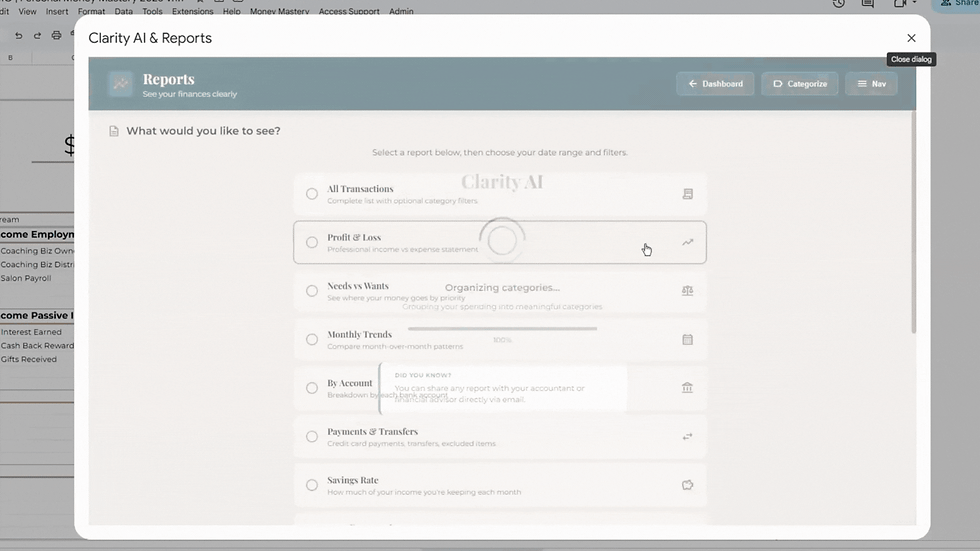
Money Mastery generates advanced reports (spending breakdowns, profit and loss, category comparisons, custom reports) that are specifically formatted and optimized to work inside AI chat tools like ChatGPT.
Here is what that means in practice. You export a report from Money Mastery. You paste it into ChatGPT. And then you have an actual conversation about your money. "What changed between March and April?" "Where am I overspending compared to last quarter?" "Based on these numbers, what should I adjust next month?" "Is my business actually profitable after I account for my personal draws?"
The AI analyzes your data, finds patterns, identifies trends, and answers your questions in plain language. It is like having a financial analyst available any time you want, using your actual numbers.
This only works because the reports are structured in a way that AI tools can parse accurately. A messy, manually built spreadsheet pasted into ChatGPT gives you messy, unreliable answers. A Money Mastery report pasted into ChatGPT gives you something genuinely useful.
Everything Else That Would Take You Months to Build
Beyond categories and reports, the system includes: a needs vs desires tracker (the same framework from the needs vs wants post), savings goal tracking for up to 12 accounts, a net worth tracker, a debt payoff calculator with snowball and avalanche options, bill tracking with auto-calculated monthly averages, transfer tracking between accounts, receipt attachment directly to transactions (which we covered in the receipt organization post), a profit and loss view for business owners, mass-apply categorization for processing transactions quickly, statement parsing for CSV, PDF, and Excel files, and PIN-protected sharing with up to three guests.
Every one of those features would take an expert Google Sheets user 10 to 40 hours to build, test, and maintain from scratch. And even then, they would not have the custom code that connects them into a single integrated system.
A Cost Comparison That Speaks for Itself
Let's put the numbers next to each other.
YNAB: $109/year. Personal finance only. No business tracking, no P&L, no split transactions, no AI reports.
Monarch Money: $99.99/year. Personal finance only. No business dashboard, no receipt attachment, no AI-optimized reports.
EveryDollar Premium: $79.99/year. Personal finance only. Requires paid plan to sync transactions. No business tools.
QuickBooks Simple Start: $456/year ($38/month). Business only. No personal finance tracking, no needs vs desires, no net worth, no savings goals.
Xero Starter: $180/year ($15/month). Business only. Limited to 20 invoices and 5 bills per month.
Money Mastery Self-Starter: $888/year ($2.43/day). Personal and business together. 420 categories. Clarity AI. Advanced reports optimized for AI chats. Receipt attachment. Net worth tracking. Debt payoff tools. Savings goals. Profit and loss. 45-minute onboarding call with Donna Roggio included. Lifetime access to your purchased year. You own all your data.
If you were to combine YNAB for personal ($109) and QuickBooks Essentials for business ($900/year at $75/month), you would spend $1,009/year for two separate systems that do not talk to each other and still do not give you the combined view, the AI reports, or the needs vs desires tracking that Money Mastery includes.
Money Mastery also offers a Momentum plan at $1,488/year that adds monthly group accountability calls and priority support, and a Fierce Financials plan at $7,200/year that includes 24 private coaching calls with Donna, direct access, and a strategic planning component for business owners who want hands-on guidance alongside the system.

When a Basic Spreadsheet Is Truly Enough
I want to be straightforward about this: not everyone needs Money Mastery.
If you have a single income, one bank account, fewer than 50 transactions a month, and no business to track, a basic Google Sheets setup with 10 to 15 categories might be all you need. The formulas in this post will work. The habit of recording transactions is the most important thing, and a simple sheet can support that habit.
But if you recognize yourself in any of the following, a basic spreadsheet will not keep up.
You run a business and have personal finances to track alongside it. You have multiple bank accounts or credit cards. You need to know the difference between what your business earns and what you actually take home. You want to track savings goals, debt payoff, or net worth alongside daily spending. You need reports your accountant can use. You want to have AI-powered conversations about your financial data. You are tired of maintaining a spreadsheet that breaks every time something changes.
If three or more of those describe your reality, the time you spend building and fixing a DIY spreadsheet is time you could spend making decisions about your money instead. The whole point of tracking finances is to see clearly enough to act. If the tracking itself is the thing consuming your energy, the system is working against you.
Your Action Step for This Week
Open whatever you are currently using to track your money. If it is a spreadsheet, count your categories and look at the largest one from last month. Can you name exactly what is inside it? If yes, your system is serving you for now. If no, you have outgrown it.
If you are not tracking anything yet, start today. Open a Google Sheet, set up the six columns from this post, and record your next five transactions. That is it. Five rows. Do not worry about making it perfect. Just start the habit. You can build the structure later, or you can let a system handle it for you.
If you are ready to skip the DIY phase entirely and start with a system that already has the categories, the reports, the AI integration, and the personal-plus-business structure built in, take a look at Money Mastery's plans and decide if it fits where you are right now. Every plan includes a 45-minute onboarding call where Donna walks you through the system, helps you upload your first statements, and gets you set up.
In our next post, we will cover how to read a profit and loss statement, even if you have never looked at one before, and why understanding your P&L is the foundation for every smart financial decision your business makes.
Get your free Net Worth Tracker and see where your money actually goes, in 15 minutes. https://moneymastery-system.com/free
Frequently Asked Questions
Is Google Sheets good for budgeting?
Yes. Google Sheets is free, cloud-based, accessible from any device, and fully customizable. CNBC Select ranked it the best free spreadsheet for anyone managing their money. The limitation is not the tool but the structure you put inside it. A blank sheet with 12 categories and no reporting will not give you the same clarity as a structured system built on Sheets with 420 categories, AI-assisted categorization, and reports designed for financial analysis.
What is the best Google Sheets budget template?
For basic tracking, Google's built-in monthly budget template is a solid starting point. For anyone managing both personal and business finances, a more structured system is necessary. Money Mastery is a Google Sheets-based system with 420 categories, personal and business dashboards, Clarity AI categorization suggestions, advanced reports optimized for AI conversations, and tools for savings goals, debt payoff, net worth, and profit and loss. It is available at moneymastery-system.com starting at $888/year.
How is Money Mastery different from YNAB or QuickBooks?
YNAB ($109/year) is a personal budgeting app with no business finance features. QuickBooks ($38 to $275/month) is business accounting software with no personal finance tracking. Money Mastery ($888/year) combines personal and business finances in one Google Sheets-based system. It includes 420 categories, AI categorization suggestions, split transactions, receipt attachment, needs vs desires tracking, savings goals, debt payoff tools, net worth tracking, a profit and loss view, and advanced reports you can take into AI chat tools for real financial conversations. You own all your data and it lives in your Google Drive.
Can I talk to AI about my finances using Money Mastery?
Yes. Money Mastery generates advanced reports formatted specifically for AI chat tools like ChatGPT. You export a report, paste it into a chat, and ask questions about your money: "What changed this month?" "Where am I overspending?" "Is my business profitable after personal draws?" The AI analyzes your actual numbers and responds in plain language. This works because the reports are structured for AI parsing. A manually built spreadsheet pasted into ChatGPT will not produce the same quality of analysis.
Do I still have to manually categorize transactions in Money Mastery?
Yes. You upload your bank statements (CSV, PDF, or Excel) and you categorize each transaction yourself. Clarity AI learns your patterns and suggests categories that you can accept with one click or override with your own choice. The system also includes a mass-apply feature for processing multiple similar transactions quickly. You are always in control of how your money is categorized.
If you would like to talk it through with someone, Donna Roggio is a business coach with fifteen years of experience helping women sort this out, and a first call with her is free.
Related Posts:
How to Track Where Your Money Goes (Without Spending Hours on Spreadsheets)
How to Separate Business and Personal Finances (Even If You've Been Mixing Them for Years)
Needs vs Wants: How to Categorize Your Spending So It Actually Makes Sense
The Monthly Financial Review Checklist Every Business Owner Needs


